
WhosDown: Connect with Friends Nearby
Overview
WhosDown is a desktop application designed to simplify the process of making new connections through casual, interest-based meetups. The software targets individuals seeking meaningful social interactions beyond superficial digital exchanges. It serves as a bridge between users and like-minded peers, enabling spontaneous and authentic gatherings. Whether looking for workout partners, coffee companions, or adventure-seeking friends, WhosDown streamlines the discovery process by matching users based on shared interests, location, and preferred meetup types.
The platform operates on a community-driven model, encouraging users to create events, join trending gatherings, and initiate conversations to plan shared experiences. It positions itself as an alternative to traditional online dating, focusing instead on real-world social bonding. The app is particularly suited for young adults, professionals, and social explorers who value in-person interaction and seek to expand their social circles in a safe, structured environment.
Developed by WhosDown Inc., the software emphasizes inclusivity and user safety, though specific security protocols were not detailed in the provided information. The application supports both Windows and Mac operating systems, making it accessible to a broad desktop user base. Users can engage in real-time chat, receive preference-based notifications, and browse activity-specific requests to find compatible companions for various social scenarios.
Key Features & Capabilities
- Interest-Based Matching – Users select categories such as fitness, coffee, or adventure to connect with individuals who share similar hobbies and lifestyles.
- Location-Based Discovery – The software leverages geolocation to suggest nearby meetups, helping users find companions within a defined radius.
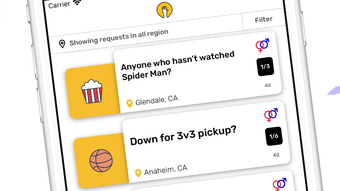
- Event Creation & Browsing – Users can create custom meetup requests or explore trending events to join spontaneous gatherings.
- Real-Time Chat Functionality – Enables direct messaging between potential friends to coordinate plans and build rapport before meeting in person.
- Preference Notifications – Users receive alerts when new matches or events align with their stated preferences.
- Activity-Specific Requests – Allows users to post specific needs, such as “Looking for a hiking buddy this weekend,” to attract relevant connections.
These features are designed to reduce friction in initiating social interactions. For example, a user interested in morning runs can create a request for a running partner, receive matches from nearby users, and coordinate a time and location via chat. Similarly, someone seeking a casual coffee meetup can browse local events and join a group session without prior commitments. The workflow prioritizes ease of use and real-world engagement, supporting both casual and recurring social plans.
User Interface, Workflow & Performance
The user interface appears to be structured around a central dashboard that displays active events, recent matches, and personalized recommendations. Navigation likely centers on intuitive icons and clear category tabs, allowing users to switch between features such as “Discover,” “Create,” and “Messages” with minimal effort. The workflow emphasizes speed and simplicity—users can initiate a connection in under a minute by selecting a category, setting a location, and sending a request.
Based on general software behavior patterns, the application is expected to operate smoothly within standard desktop environments. However, exact performance details were not specified. The developer did not provide information on CPU or RAM usage, nor did they disclose stability benchmarks or load times under heavy use. Resource consumption patterns remain unknown, though the 128 MB installation size suggests a lightweight footprint.
Stability and responsiveness are assumed to be consistent with typical desktop applications, but no real-world testing data was provided. The software’s performance may vary depending on network conditions and background processes, especially during real-time chat sessions or event updates. Users are advised to monitor system behavior during initial use to assess responsiveness.
Compatibility & System Requirements
WhosDown is compatible with both Windows and Mac operating systems, offering broad accessibility across major desktop platforms. The software version is listed as 1.0.0, indicating a stable initial release. Installation size is 128 MB, which is relatively modest for a modern desktop application.
Exact system requirements were not listed. The developer did not provide information on minimum processor speed, RAM, or storage needs. Compatibility with older OS versions or low-end hardware remains unspecified. Users should verify their system configuration before installation, as no official specifications were shared. Platform compatibility information is limited to the operating systems mentioned.
Pros and Cons
Pros
- Simple, intuitive interface for quick onboarding and use
- Interest-based matching helps users connect with like-minded individuals
- Location-aware features enhance real-world social discovery
- Real-time chat enables pre-meetup coordination
- Free to download and use with no upfront cost
- Supports both Windows and Mac, increasing accessibility
Cons
- No detailed system requirements provided
- Performance and resource usage data were not disclosed
- Exact security and privacy measures are unspecified
- Offline functionality details were not included
- Community size and user base statistics are not available
FAQ Section
Is WhosDown available for Windows and Mac?
Yes, WhosDown is compatible with both Windows and Mac operating systems, allowing users on either platform to download and use the application.
Is the software free to use?
Yes, WhosDown is available at no cost. The software is listed as free, with no subscription or in-app purchase requirements mentioned in the provided details.
Does WhosDown require an internet connection?
Yes, the application relies on real-time connectivity for features such as event discovery, chat functionality, and location-based matching. Offline usage is not supported based on the described functionality.
How often are updates released?
The software version is currently 1.0.0, indicating a stable initial release. No information was provided about update frequency or automatic update mechanisms.
What kind of license does WhosDown use?
The license type was not specified in the provided data. No details were shared regarding open-source status, redistribution rights, or usage restrictions.
Final Thoughts + CTA
WhosDown presents a compelling solution for individuals seeking genuine, low-pressure social connections through casual meetups. Its focus on shared interests and real-world interaction sets it apart from conventional social platforms. While detailed technical specifications are limited, the software’s intuitive design and cross-platform availability make it accessible to a wide audience. The free pricing model further enhances its appeal, removing financial barriers to entry.
Users who value spontaneous adventures, authentic friendships, and community-driven experiences will find WhosDown to be a valuable tool. Although performance and security details are not fully disclosed, the app’s core functionality appears well-aligned with modern social needs. For those ready to expand their social circle with like-minded peers, WhosDown offers a promising starting point.
Download WhosDown now to start connecting with friends nearby and explore a world of shared experiences.







